Hardware Acceleration
Camera and screen share video is encoded on the GPU whenever the hardware and driver will take it. When they won't, GameVox falls back to software and keeps going. This page covers how that choice is made, what your GPU can do, and where to look when the answer isn't what you expected.
Hardware encoding is only one of the things that decides how your video looks. Two others bite more often: the bitrate ceiling your groups on that server set, and the automatic downscale that kicks in when your connection can't carry the stream. Both are covered in why the picture can still look bad.
On this page
Checking what you're using
Settings → Voice & Video → Streaming Quality is the quickest answer. The Video Codec dropdown labels each option Hardware Accelerated, Software Encoding or Unsupported, and greys out the ones your machine can't do at all. Underneath it, the Hardware acceleration card lists the encoder backend the desktop client probed at startup (NVENC, AMF, QSV, VAAPI or VideoToolbox), the codecs it exposes, and the decode backend paired with it. That probe runs in the background at launch, so the card is normally filled in by the time you open Settings.
For a call already in progress, the voice channel's activity log is better. When anyone starts a camera or screen share, a dimmed sub-line under that entry gives the codec, the encoder name and a hardware or software flag, something like AV1 · AV1 (FFmpeg-NVENC) · hardware. Encoder swaps mid-stream get their own entry, so you can see when a hardware path gave up and what replaced it.
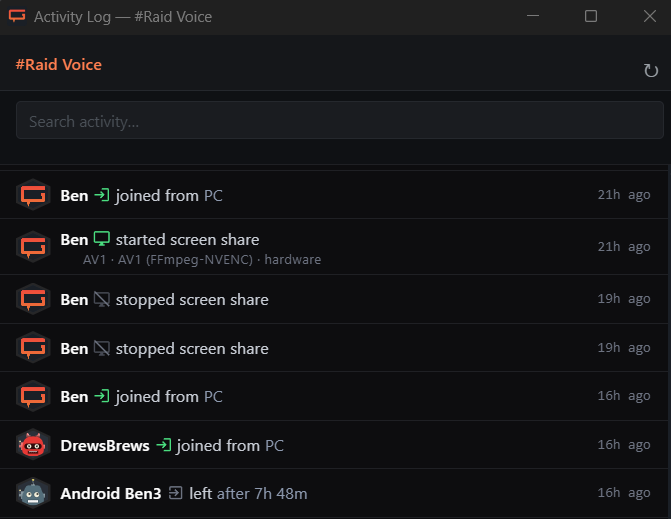
The desktop log file has the rest. It lives at %LOCALAPPDATA%\GameVox\logs\ on Windows, ~/Library/Application Support/GameVox/logs/ on macOS and ~/.gamevox/logs/ on Linux. Lines worth searching for:
[HWEnc] Detected:the encoder backend and which codecs it claims[NVENC] Function table loaded successfully (API X.Y)the NVENC API version your NVIDIA driver exposesSelected encoder:what the ladder settled on for this share[FFmpegHW] Createdthe encoder opened, with resolution and bitrate[EncSelect] ... trial faileda hardware encoder rejected the request and the ladder moved on[ScreenShare-Win] Capture backend:WGC, DXGI or BitBlt, the Windows capture method in use
How a codec gets picked
GameVox negotiates AV1, VP9, H.264 and VP8. HEVC is not in that set, so the tables below don't list it even though most of these GPUs can encode it.
The sender walks a ladder top to bottom and stops at the first rung the server offered and the GPU will actually open. That second part is not a guess: the client builds a throwaway encoder at the exact resolution and bitrate it is about to use, because plenty of drivers pass at 1080p and fail at 4K.
Windows
- AV1 on the GPU:
av1_nvenc,av1_amforav1_qsv - VP9 on the GPU:
vp9_qsvonly. NVIDIA and AMD never shipped VP9 encode silicon, so those systems skip past this rung entirely - H.264 on the GPU:
h264_nvenc,h264_amforh264_qsv - VP9 in software (libvpx), then VP8, then AV1 through libaom
Linux
- VAAPI AV1, once the out-of-process VAAPI probe has confirmed it works
- NVENC AV1, for NVIDIA machines without the
nvidia-vaapi-driverbridge - VAAPI VP9
- VAAPI H.264, camera and DJ video only
- NVENC H.264
- libaom AV1, then libvpx VP9, then VP8
Screen share deliberately skips the VAAPI H.264 rung. Driver quality on screen content has been bad enough on Intel and AMD, blocking badly during high motion, that software VP9 is the better picture. NVENC H.264 stays enabled for screen share, so an NVIDIA machine on Linux still gets hardware H.264 rather than dropping all the way to a software encoder.
VAAPI AV1 is the one rung that won't run on trust. Stock Mesa radeonsi has a history of hanging on the first AV1 attempt, so the client skips AV1 until a separate probe process has opened it successfully at least once. On a first launch that can mean NVENC or software AV1 for the first share and VAAPI AV1 from then on.
macOS
The macOS build doesn't ship the FFmpeg hardware encoders at all. Encode and decode both go through VideoToolbox inside WebKit's WebRTC stack, which gets you accelerated H.264 but not AV1: Apple has never put an AV1 encoder in any chip.
Overriding the choice
The Video Codec dropdown moves your pick to the front of the ladder rather than forcing it. Select AV1 on a GTX 1080 and there is no AV1 encoder to open, so the ladder resumes its normal order instead of failing the share. Auto is almost always the right setting.
Platform paths
| OS | Encoding | Decoding | Vendors |
|---|---|---|---|
| Windows 10/11 | NVENC, AMF, Quick Sync | D3D11VA | NVIDIA, AMD, Intel |
| Linux | VAAPI, NVENC | VAAPI, then NVDEC | AMD (Mesa), Intel (iHD), NVIDIA |
| macOS | VideoToolbox via WebKit | VideoToolbox via WebKit | Apple Silicon, Intel Macs |
On Linux the decoder tries VAAPI first and falls through to NVDEC, so an NVIDIA card decodes in hardware without the nvidia-vaapi-driver bridge installed. Decoded hardware frames come back as NV12 and are converted to RGBA on the CPU, which costs about what the software decoder's own conversion step does.
Encoding by GPU
Sending video: camera and screen share.
| GPU family | H.264 | VP9 | AV1 |
|---|---|---|---|
| NVIDIA, via NVENC | |||
| RTX 40 / 50 (Ada Lovelace, Blackwell) | Yes | No | Yes |
| RTX 20 / 30, GTX 16 (Turing, Ampere) | Yes | No | No |
| GTX 600 through GTX 10 (Kepler to Pascal) | Yes | No | No |
| AMD, via AMF on Windows and VAAPI on Linux | |||
| RX 7000 / 9000, Phoenix APUs (RDNA 3, RDNA 4) | Yes | No | Yes |
| RX 400 through RX 6000 (Polaris to RDNA 2) | Yes | No | No |
| Intel, via Quick Sync on Windows and VAAPI on Linux | |||
| Arc A/B series, Core Ultra (Alchemist, Battlemage, Meteor / Lunar / Arrow Lake) | Yes | Yes | Yes |
| 7th to 14th gen Core (Kaby Lake to Raptor Lake) | Yes | Yes | No |
| 4th to 6th gen Core (Haswell to Skylake) | Yes | No | No |
| Apple, via VideoToolbox | |||
| Apple Silicon and T2 Intel Macs | Yes | No | No |
Intel is the only vendor that ever built a VP9 encoder into consumer parts, starting with Kaby Lake. AV1 encode arrived with Arc and the Core Ultra iGPUs on Intel, RDNA 3 on AMD and Ada Lovelace on NVIDIA. Anything older encodes H.264 in hardware and everything else in software.
Decoding by GPU
Receiving video from everyone else in the channel.
| GPU family | H.264 | VP9 | AV1 |
|---|---|---|---|
| NVIDIA, via NVDEC (D3D11VA on Windows, CUDA on Linux) | |||
| RTX 30 and newer (Ampere and up) | Yes | Yes | Yes |
| GTX 10 / RTX 20 (Pascal, Turing) | Yes | Yes | No |
| GTX 900 (Maxwell 2) | Yes | 8-bit only | No |
| GTX 600 / 700 (Kepler) | Yes | No | No |
| AMD, via VCN (D3D11VA on Windows, VAAPI on Linux) | |||
| RX 6000 and newer (RDNA 2 and up) | Yes | Yes | Yes |
| RX Vega, RX 5000 (RDNA 1) | Yes | Yes | No |
| RX 400 / 500 (Polaris) | Yes | No | No |
| Intel, via Quick Sync (D3D11VA on Windows, VAAPI on Linux) | |||
| Arc, Core Ultra, 11th gen and newer (Tiger Lake and up) | Yes | Yes | Yes |
| 7th to 10th gen Core (Kaby Lake to Comet Lake) | Yes | Yes | No |
| 6th gen Core (Skylake) | Yes | 8-bit only | No |
| 4th / 5th gen Core (Haswell, Broadwell) | Yes | No | No |
| Apple, via VideoToolbox | |||
| Apple Silicon, M3 and newer | Yes | Yes | Yes |
| Apple Silicon, M1 and M2 | Yes | Yes | No |
| Intel Macs with a T2 chip (2018 and later) | Yes | No | No |
These columns describe the silicon. A GPU that can decode a codec still needs a driver that exposes it, and a Linux box missing libva-drm decodes in software no matter what the hardware supports. GameVox attempts hardware decode first and switches to software if the accelerator won't initialise, on the first frame.
Why the picture can still look bad
A hardware encoder on a capable GPU can still produce a soft or stuttery stream, because resolution and codec are not the only things in play. The two most common causes have nothing to do with the tables above.
Your groups can cap the bitrate
Server owners can put a bitrate ceiling on a group, separately for screen share, camera and microphone. The ceiling you actually encode at is the lower of the server's tier and your group's limit, so a Diamond server can still hold a given group to 2.5 Mbps of screen share. Screen share ceilings run from 2.5 up to 25 Mbps, camera from 0.8 to 10 Mbps, and microphone from 48 to 256 kbps.
Belonging to several groups gets you the most generous ceiling among them, not the strictest, and a group with no ceiling set leaves you uncapped. Server owners aren't subject to their own limits. If a cap applied to a stream, the channel's activity log says so on the same dimmed sub-line that carries the codec and encoder, so that log is the fastest way to tell a group limit apart from an encoder problem.
It downscales on its own when bandwidth runs out
The quality you pick is a ceiling, not a promise. When people watching your stream start losing packets, the server measures that and tells your client to back off; your encoder is rebuilt at the lower bitrate within a second or so. Once the congestion clears the server lifts the limit and your chosen preset comes back on its own. Nothing needs restarting.
What gives way first depends on what you're sending. Screen share defaults to protecting resolution, so text and UI stay sharp and the frame rate drops instead. Switching screen share to the framerate-first mode inverts that, which suits gameplay better than a spreadsheet. Camera video always protects the frame rate and lets resolution slide, because a smooth face reads better than a sharp, stuttering one.
This is triggered by your real upload capacity at that moment, so a household saturating the uplink, a busy Wi-Fi link, or a VPN can all cause it while your GPU sits nearly idle. A stream that looks fine and then degrades a few minutes in is almost always this rather than an encoder fault.
When it falls back to software
Nothing breaks when hardware acceleration isn't available. Software VP9 handles 1080p30 comfortably on any recent CPU, and on older machines, dropping screen share to 720p is usually enough. These are the common reasons it happens.
An NVIDIA driver that's too old. NVENC has a versioned API and a driver older than the client's build expects gets rejected outright. When that happens the Settings card says so and names the minimum driver branch you need, from 522.25 for NVENC API 12.0 up to 610 for 13.1, rather than quietly leaving you on software.
Missing VA-API drivers on Linux. If no encoder turns up at all, the Settings card names the package for your CPU: intel-media-va-driver on Broadwell and newer Intel, i965-va-driver on Haswell and older, and mesa-va-drivers on AMD.
A codec the silicon doesn't have. Detection is optimistic on Intel, where every GPU initially claims VP9 and AV1, so the real answer only shows up when the trial encoder is opened. A rung that fails for a reason which can't change while the app is running, such as the driver reporting the encode block missing, is dropped for the rest of the session instead of being retried on every share. Restart GameVox to re-probe after a driver update.
You're on the web client. Browsers encode and decode through WebCodecs, and whether that lands on the GPU is up to Chrome, Edge or Firefox. Everything above is about the desktop app.