GameVox for Minecraft
A Minecraft channel in your GameVox server: who is online, a live map of your world, player profiles, trades, items and recipes, and server admin that your own groups control. Free, with a small plugin or mod on your Minecraft server.
Not an official Minecraft product. Not approved by or associated with Mojang or Microsoft.
Try the Channel
This is the Minecraft channel with sample data. Click around: the map, players, cameras, trades and profiles all work, and nothing you do here changes anything.
Try It on Our Server
GameVox runs its own Minecraft server with the integration installed. Join it with Java Edition 1.21.4.
minecraft.gamevox.comWhat You Get
A Minecraft channel in your GameVox server, kept up to date by your Minecraft server
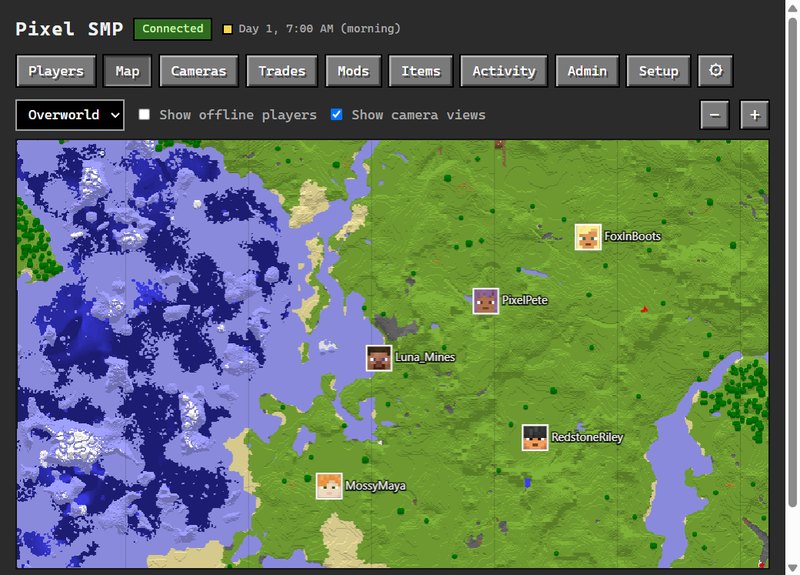
Live World Map
A top-down map of the parts of your world that players have explored, in the game's own map colors. Pan and zoom, switch between the Overworld, the Nether and the End, and see everyone online as a pin.
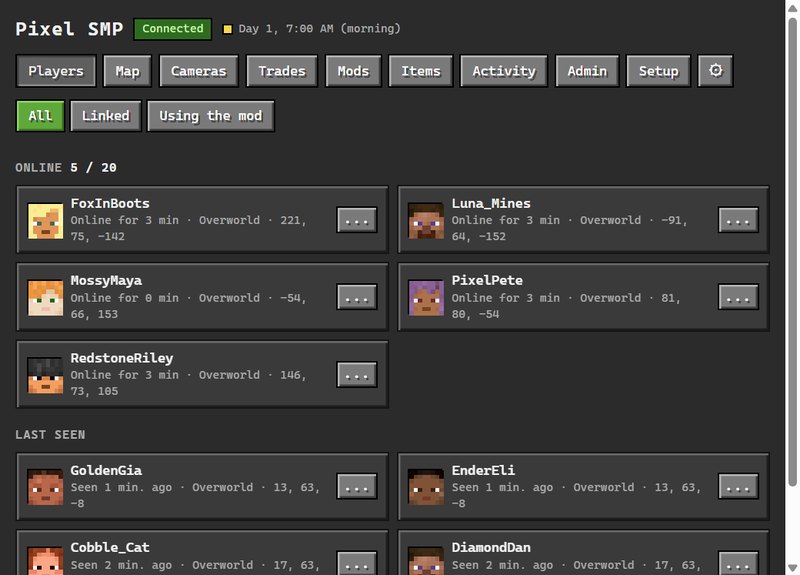
Who Is Online
Everyone on the server right now with their player head, cut from their skin, and where everyone else was when they logged out.
Player Profiles
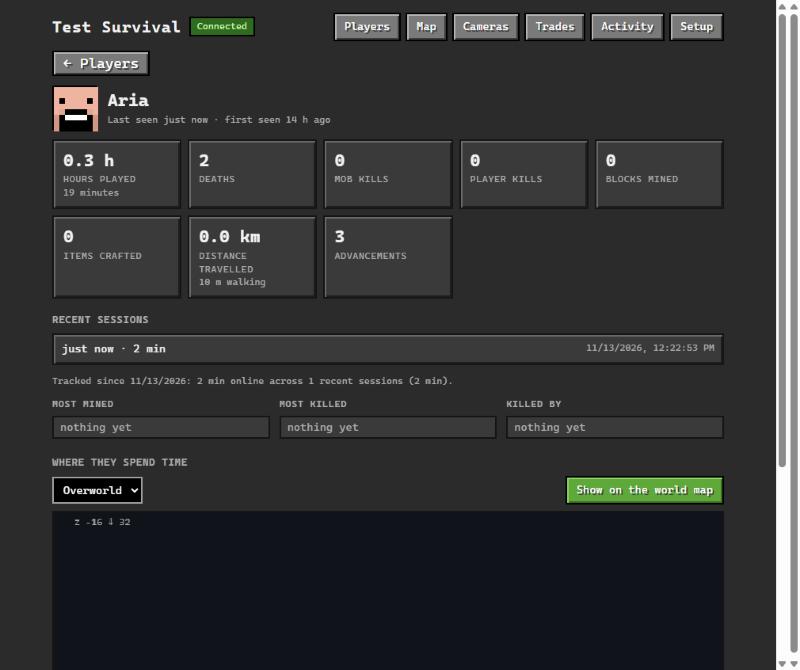
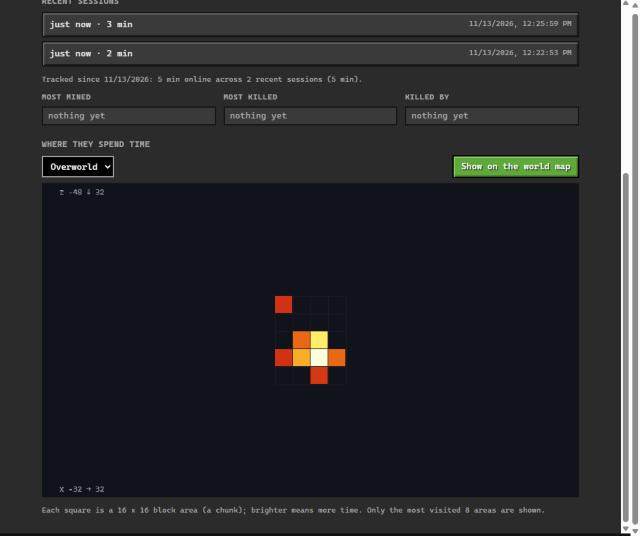
Hours played, kills, deaths, blocks mined and recent sessions. Managers can also see a heat map of where a player spends their time. The numbers stay on your Minecraft server and are read when someone opens a profile.
Safe Trading
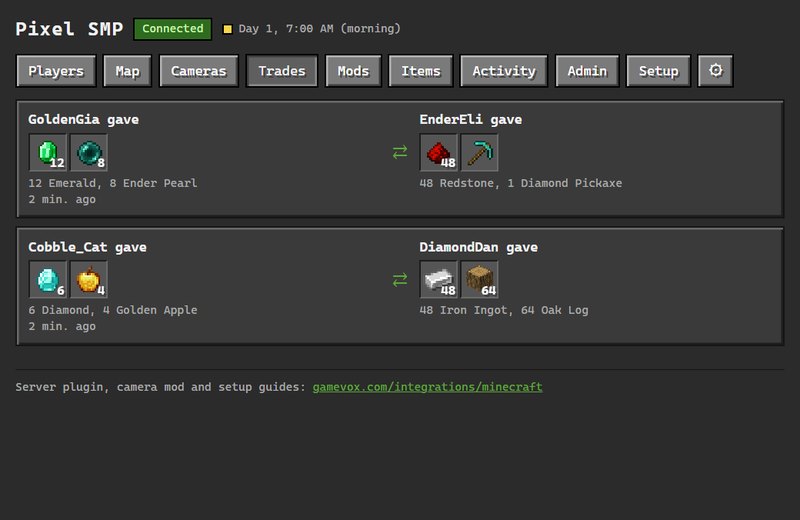
Players trade in a chest screen in the game. Both confirm, and after a short countdown the items swap in one step. Any change resets it, so nothing gets slipped in at the last second. Recent trades show in GameVox.
Items and Recipes
Browse every item on the server by mod, search by name, and see how anything is made and what it is used in, modded items included. Copy or save a recipe card as a picture to share it.
Mods and Plugins
A list of everything installed on the server, with versions, descriptions, authors and websites, read from the server when you open it.
Server Admin From GameVox
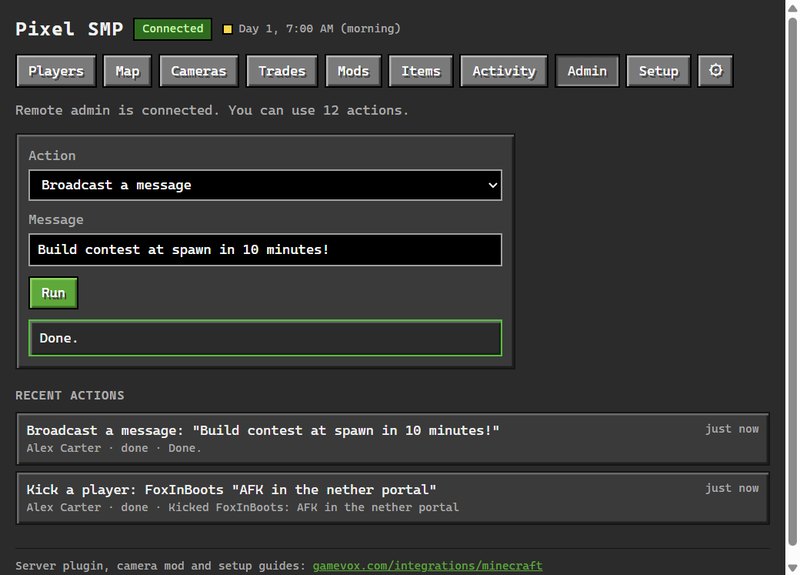
Kick, ban, whitelist, op, game mode, teleport, messages, time, weather, difficulty, save, stop and the console. Each action is a permission you give to the GameVox groups you choose, and every one is logged with who ran it.
Players Can Opt Out
Where the server allows it, a player can type /gvprivacy hide. GameVox then stops showing where they are and their profile, and the server deletes what it kept about them. /gvprivacy show undoes it.
Bedrock Players Too
Bedrock players who join your Java server through Geyser and Floodgate show up like everyone else, marked as Bedrock.
The Minecraft Channel
What your members see in GameVox
Server Setup
For Minecraft server owners. Takes about five minutes.
Download the server package
One zip with a folder for each server type. Stop your server and copy the jar from the folder that matches it, as shown below. Each folder also has an INSTALL.txt with the same steps.
Paper, Spigot, Purpur
- Folder in the zip
paper-spigot-purpur/- Copy the jar to
plugins/- Settings file
plugins/GameVoxLink/config.yml- Needs
- Minecraft 1.20 or newer, Java 17 or newer
Fabric
- Folder in the zip
fabric/- Copy the jar to
mods/- Settings file
config/gamevoxlink.properties- Needs
- Minecraft 1.21.4, Java 21 and Fabric API
NeoForge
- Folder in the zip
neoforge/- Copy the jar to
mods/- Settings file
config/gamevoxlink.properties- Needs
- Minecraft 1.21.4, Java 21
Add the app to your GameVox server
Install the GameVox Link for Minecraft app on your GameVox server and create a Minecraft app channel. You need to be a server manager.
Create a plugin token
Open the channel and go to Setup (only managers see it). Press Create plugin token. GameVox shows an endpoint and a token, once.
Add them to the settings file and restart
Start the Minecraft server once so it writes its settings file, put the endpoint and the token in it, and restart. On Paper, Spigot and Purpur the file is plugins/GameVoxLink/config.yml. On Fabric and NeoForge it is config/gamevoxlink.properties. The Setup screen shows Connected within seconds.
Keep the Token Private
Whoever has the token can report as your server. If it leaks, press Create plugin token again and the old one stops working at once.
Remote Admin Starts Off
Turn it on in the settings file and list the actions you allow, for example admin.enabled=true and admin.allow=kick,ban,unban,whitelist_add,save (on Paper, the admin: section of config.yml). Only the actions you list can ever run. Then choose which GameVox groups may use each one in the channel's permissions. Op, stop and console start with nobody.
Camera Views for Players
The GameVox Cam mod is optional, for players who want to share pictures of places
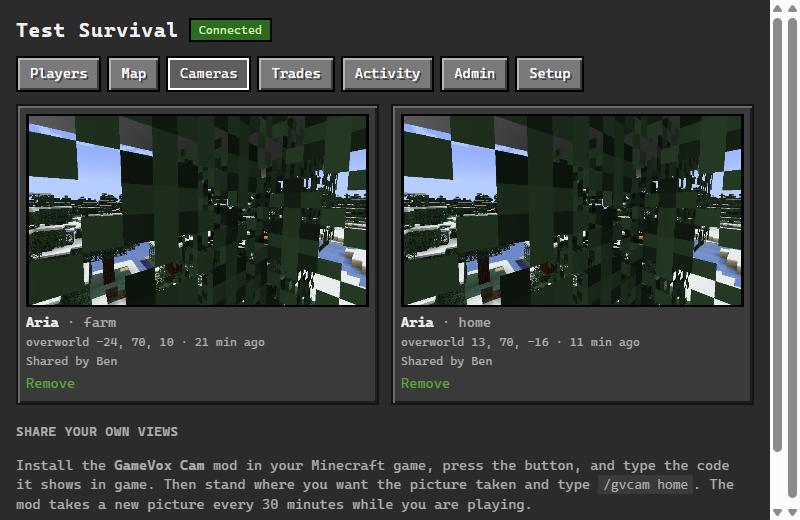
Save up to 8 views in your game. The mod takes a picture of each one every 30 minutes and posts it to the channel's Cameras tab, so your friends can see the farm, the base or the build without joining.
Install the mod
The GameVox desktop app can install it for you, along with the mod loader and Fabric API: Settings > Game Addons > Minecraft. You can also download it for your loader and put it in your mods folder yourself. It is made for Minecraft 1.21.4 on Fabric, NeoForge and Forge.
Download the mod for Minecraft 1.21.4
Connect it
Join the Minecraft server and press G, type /gv or use the GameVox button on the pause menu. Press Connect and allow it in GameVox. Not using the desktop app? Open the Cameras tab, press Make a linking code and type the command it shows.
Save your views
Stand where you want the picture taken, look the way you want, and save it as your home view or under a name. A first picture is sent right away, then a new one every 30 minutes while you play.
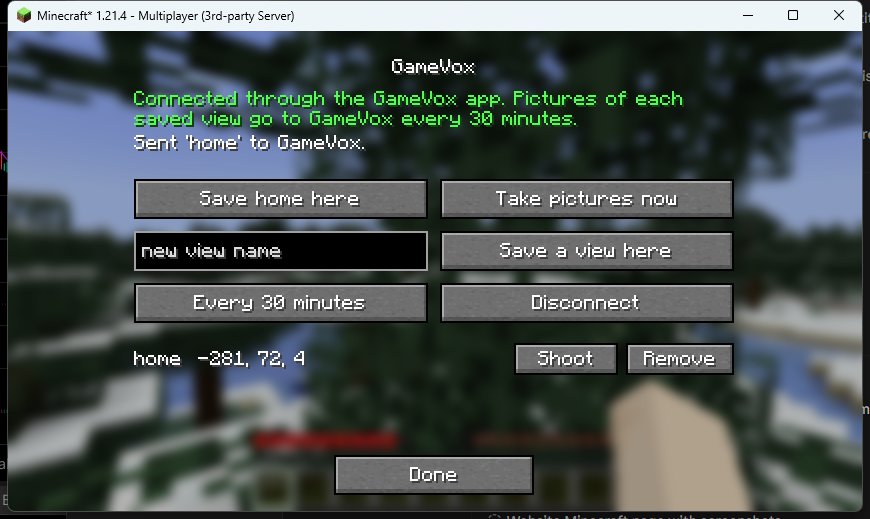
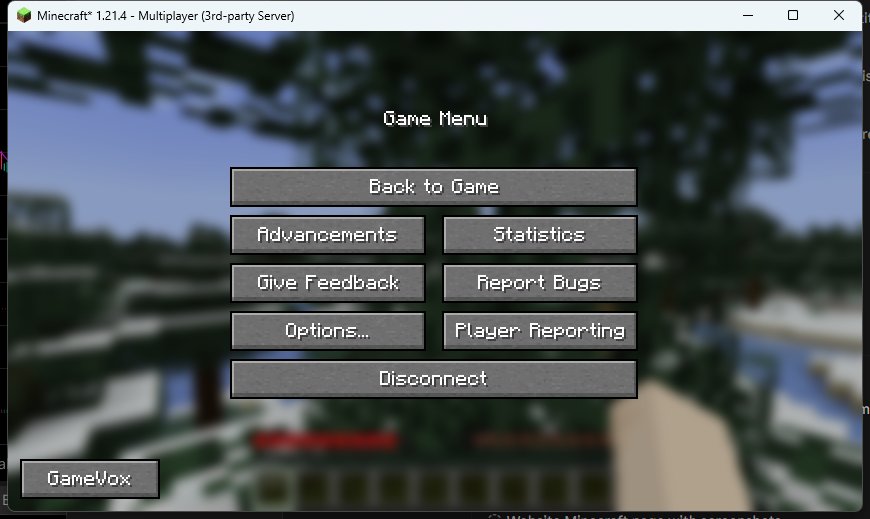
How a Picture Is Taken
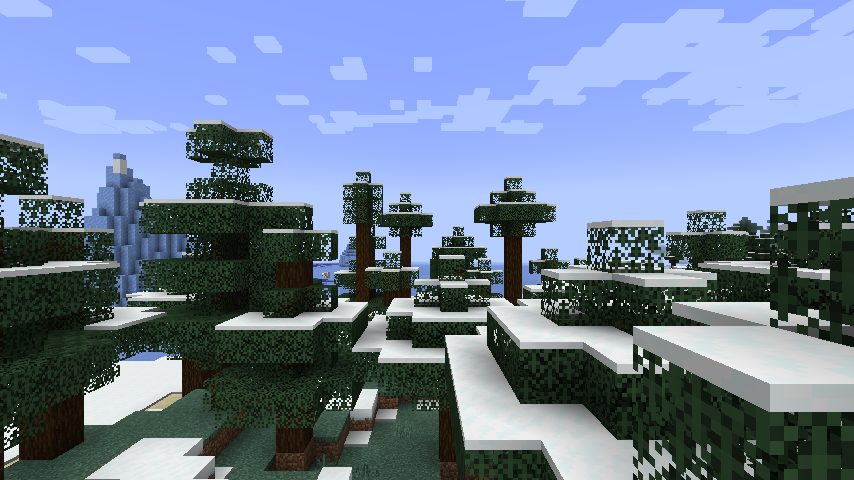
The mod moves your game's camera to the saved spot for a moment (the screen flickers for about a tenth of a second), reads the frame and puts everything back. Nothing is added to the world. A view can only be photographed while you are in the same dimension and close enough for your game to have it loaded. Pictures are not live video, and you can remove yours from the Cameras tab at any time.
Questions
Does it work with Bedrock Edition?
Bedrock players who join a Java server through Geyser and Floodgate show up and are marked as Bedrock. The camera mod is for Java Edition only.
Which versions are supported?
The Paper, Spigot and Purpur plugin runs on Minecraft 1.20 and newer. The Fabric and NeoForge server mods and the camera mod are made for Minecraft 1.21.4.
Will it slow my server down?
It sends a small report every 10 seconds and draws a couple of map chunks per tick while players explore. Map drawing can be turned off in the settings file.
What does GameVox receive?
Player names and ids, positions, join, leave and death events, the map pictures, each player's small face image, finished trades and pictures of the traded items, and the server's name, version and tick rate. Profile statistics and heat maps stay on your server, and GameVox reads them only when a member opens a profile. Camera pictures only come from players who connected the camera mod.
Is this made by Mojang?
No. Not an official Minecraft product. Not approved by or associated with Mojang or Microsoft.
Put Your World in GameVox
One download for your Minecraft server, one app channel, and a token from GameVox.
Not an official Minecraft product. Not approved by or associated with Mojang or Microsoft.